PDFy | Markdown to PDF Converter
Note
A minimalist, focused tool for developers and technical writers who need quick, reliable Markdown to PDF conversion without complex setup.
Project Overview
Introduction
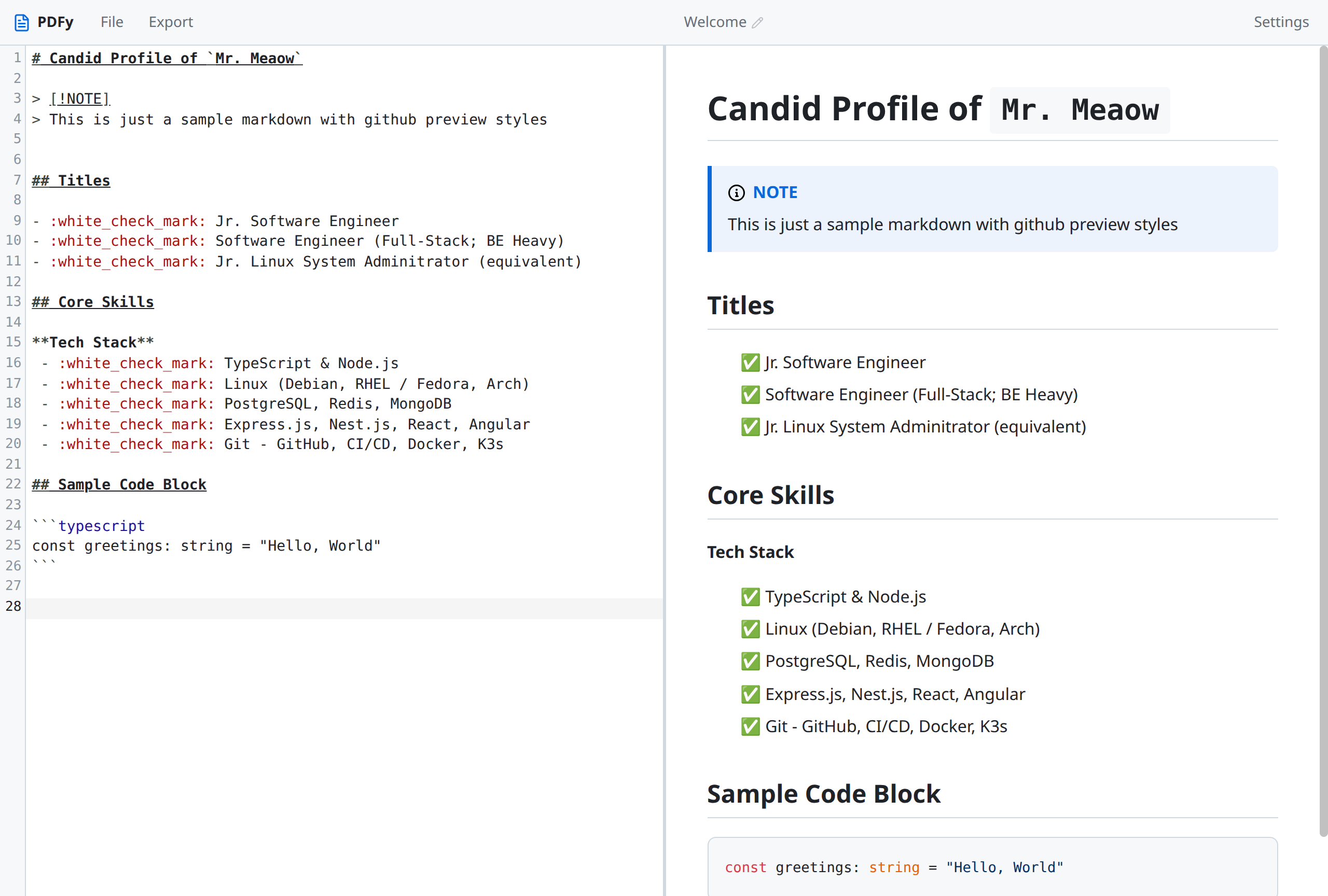
PDFy (also known as Mdpdfy) is a lightweight, web-based Markdown to PDF conversion tool built with React, TypeScript, and Vite. It provides a simple, intuitive interface for transforming Markdown documentation, notes, and technical writing into professional PDF documents instantly.
This project was created to solve a common pain point: quickly converting Markdown documentation into shareable, printable PDF format without requiring complex tooling or command-line knowledge.
✨ Key Features
Instant Conversion
- Real-Time Preview - See your Markdown rendered as you type
- One-Click Export - Generate PDF with a single click
- No Registration Required - Use immediately without creating an account
Clean Interface
- Split-View Editor - Side-by-side Markdown editor and live preview
- Responsive Design - Works seamlessly on desktop and mobile devices
- Minimalist UI - Focused, distraction-free writing experience
Quality Output
- Professional Styling - Clean, readable PDF output with proper formatting
- Syntax Highlighting - Code blocks rendered with syntax highlighting
- Table Support - Complex tables preserved in PDF output
🛠️ Tech Stack
PDFy is built with a modern, lightweight stack:
Frontend
- React - Component-based UI with hooks
- TypeScript - Type-safe development with full IDE support
- Vite - Lightning-fast HMR and optimized builds
- TailwindCSS - Utility-first styling for rapid UI development
Core Libraries
- html2pdf - HTML to PDF conversion in the browser
- marked - Fast Markdown parsing and rendering
- ESLint - Code quality and consistency
🏗️ Architecture
Project Structure
pdfy/
├── src/
│   ├── components/     # React components
│   ├── hooks/          # Custom React hooks
│   ├── utils/          # Utility functions
│   ├── styles/         # Global styles
│   └── App.tsx         # Main application
├── public/             # Static assets
├── index.html          # Entry HTML
├── vite.config.ts      # Vite configuration
└── package.json        # Dependencies
Conversion Pipeline
flowchart LR
    MD["Markdown<br/>Input"] -->|Parse| Parser["marked<br/>Parser"]
    Parser -->|HTML| Render["HTML<br/>Render"]
    Render -->|Convert| PDF["html2pdf<br/>Engine"]
    PDF --> Output["PDF<br/>Output"]

    style MD fill:#dbeafe,stroke:#333,stroke-width:2px
    style Parser fill:#f0fdf4,stroke:#333,stroke-width:1px
    style Render fill:#fef3c7,stroke:#333,stroke-width:1px
    style PDF fill:#fae8ff,stroke:#333,stroke-width:1px
    style Output fill:#d1fae5,stroke:#333,stroke-width:2px
🚀 Live Demo
- Live App: https://mdpdfy.netlify.app
- Source Code: https://github.com/mrmeaow/pdfy
Quick Start
- Visit the live demo at mdpdfy.netlify.app
- Write or paste your Markdown content in the editor
- Preview the rendered output in real-time
- Click “Export PDF” to download your document
🎯 What Makes This Project Unique
-
Minimalist Approach - Built on a minimal Vite + React + TypeScript template, focusing purely on core conversion functionality
-
Browser-Based Processing - All conversion happens client-side, no server required, ensuring privacy and speed
-
Zero Configuration - No setup, no installation, no dependencies for end users
-
Modern Dev Experience - Leverages Vite’s fast HMR and TypeScript for type-safe, efficient development
-
Lightweight - Small, focused codebase with clear separation of concerns
-
Open Source - Free to use, modify, and deploy for personal or commercial projects
📸 Screenshots
🔧 Local Development
# Clone the repository
git clone https://github.com/mrmeaow/pdfy.git
cd pdfy

# Install dependencies
pnpm install

# Start development server
pnpm dev

# Build for production
pnpm build
📝 Usage Examples
Basic Markdown
# My Document

This is a **bold** statement and this is *italic*.

## Code Example

\`\`\`typescript
const greeting = "Hello, PDFy!";
console.log(greeting);
\`\`\`

### Lists

- Item 1
- Item 2
- Item 3
Tables
| Feature | Status |
|---------|--------|
| Markdown Parsing | ✅ |
| PDF Export | ✅ |
| Syntax Highlighting | ✅ |
🗺️ Roadmap
PDFy is in early development. Planned features include:
- Custom PDF themes and templates
- Batch conversion support
- Image embedding in PDFs
- Custom page size and margins
- Dark mode for the editor
- Export to other formats (DOCX, EPUB)
🤝 Author & Contact
- Author: @mrmeaow - Full-Stack Developer | TypeScript Enthusiast
- Email: iam.mahabub@proton.me
- Other Projects:
📄 License
MIT License - See LICENSE for details.
🙏 Acknowledgments
- html2pdf.js - HTML to PDF conversion library
- marked - Fast Markdown parser
- Vite - Next generation frontend tooling